
The short answer is yes, you can cut aluminum on a desktop CNC router. The realistic answer is that it requires the right feeds and speeds, proper tooling, machine modifications, and acceptance of slower material removal rates than a dedicated mill. Many beginners expect to cut aluminum as fast as regular wood and are disappointed when the machine shakes violently, the tool breaks immediately, or the surface finish is rough and poor.
I personally cut aluminum on my first CNC router which was an inexpensive $500 machine with an air-cooled spindle. The very first attempt at cutting aluminum was a complete disaster. The tool chattered loudly, the spindle overheated significantly, and the finished part was completely unusable. After learning the correct approach with proper tooling and conservative parameters, I now cut aluminum regularly and successfully on the exact same class of machine.
This guide covers everything you need to know to cut aluminum successfully on a desktop CNC router including machine requirements, tool selection, feeds and speeds, coolant options, modifications, and realistic limitations.
Machine Requirements
Frame Rigidity and Spindle Power
The machine must have a rigid enough frame to resist the cutting forces of aluminum without excessive flex or vibration. Desktop routers with aluminum extrusions are adequate for light cuts with small tools. Machines with steel frames or reinforced gantries are better and allow deeper cuts. The rigidity of the frame determines the maximum depth of cut you can take before the machine shakes or the tool breaks.
The spindle must be capable of running at the correct speed range for aluminum which is typically 8,000 to 12,000 RPM with carbide tools. Air-cooled spindles can overheat when running at low RPM for extended periods because the cooling fan moves less air at lower speeds. Liquid-cooled spindles handle aluminum cutting better because they maintain consistent temperature across the entire speed range.
The machine must have sufficient feed rate capability for aluminum. Aluminum requires higher feed rates than wood at the same RPM to maintain proper chip load per tooth. A machine that maxes out at 60 inches per minute may not have enough speed for effective aluminum cutting with small tools. A machine capable of 100 inches per minute or higher is recommended.
Common Aluminum Cutting Problems on Routers
The most common problem beginners face when cutting aluminum on a router is chip welding. The aluminum chip sticks to the cutting edge and the tool stops cutting effectively. The symptoms are increased noise, rough surface finish, and rapid tool wear. The fix is to use a single-flute tool with polished flutes and apply lubricant.
The second most common problem is spindle overheating. Air-cooled spindles running at 8,000 to 10,000 RPM for extended periods generate more heat than the cooling fan can remove at that speed. The spindle gets hot enough to damage the bearings. The fix is to take breaks between cuts or switch to a liquid-cooled spindle.
The third problem is machine vibration. The higher cutting forces of aluminum compared to wood cause the machine frame to vibrate. The vibration creates chatter marks on the surface and can loosen fasteners. The fix is to reduce the depth of cut until the vibration stops.
Minimum Machine Specifications
| Specification | Minimum | Recommended |
|---|---|---|
| Frame material | Aluminum extrusion | Steel or reinforced extrusion |
| Spindle power | 1.5 HP (300W) | 2.0 HP (500W) |
| Spindle cooling | Air | Liquid |
| Spindle speed range | 8,000-12,000 RPM | 8,000-15,000 RPM |
| Feed rate (X/Y) | 100 IPM | 200+ IPM |
| Work area | Any | Any |
Use this table as a buying guide when selecting a machine for aluminum work. Machines meeting the recommended specifications provide significantly better results than those at the minimum threshold.
Tool Selection for Aluminum
Single-Flute vs Multi-Flute Tools
Tool selection is the single most important variable for cutting aluminum on a router. The right tool makes the difference between a successful cut and a broken tool. Investing in quality tools designed for aluminum pays for itself in reduced breakage and better results.
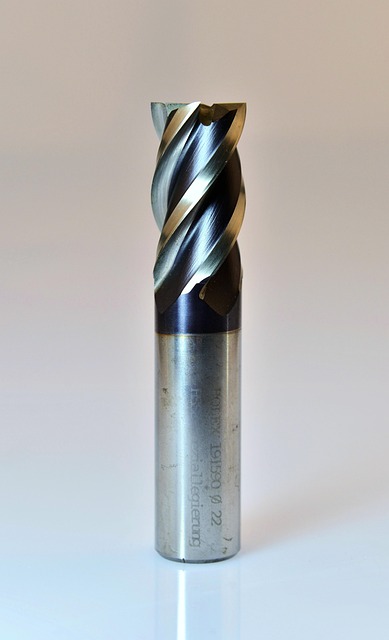
Use single-flute or two-flute end mills specifically designed for aluminum cutting. Single-flute tools have the largest chip clearance of any tool design and are the best choice for desktop routers with limited rigidity. The single large flute allows chips to evacuate completely without clogging the cutting zone. Aluminum chips are long, stringy, and sticky. They clog the flutes of multi-flute tools rapidly which leads to tool breakage.
Carbide vs HSS and Polished Flutes
Use carbide tools rather than HSS for all aluminum cutting. Carbide stays sharp significantly longer than HSS and allows higher cutting speeds that improve surface finish. The higher purchase price of carbide is justified by much longer tool life and consistently better surface finish on every part.
Use tools with a polished flute surface whenever possible. The polished finish reduces friction between the chip and the tool surface and prevents aluminum from welding to the cutting edge. Aluminum that welds to the tool increases cutting forces dramatically and causes poor surface finish within seconds.
Recommended Tools for Aluminum on a Router
| Operation | Tool | Diameter | Flutes |
|---|---|---|---|
| Roughing | Single-flute end mill | 1/8 or 1/4 in | 1 |
| Finishing | Two-flute end mill | 1/8 or 1/4 in | 2 |
| Slotting | Single-flute end mill | 1/8 in | 1 |
| Drilling | Carbide drill | As needed | 2 |
Feeds and Speeds for Aluminum
Calculating Chip Load
Feeds and speeds for aluminum on a desktop router must be calculated carefully to maintain the correct chip load. The goal is to maintain a chip load of 0.0005 to 0.001 inches per tooth. The chip load is the amount of material each cutting edge removes per revolution and it determines whether the tool cuts cleanly or rubs against the material.
The formula for feed rate is RPM x number of flutes x chip load per tooth. For a 1/8 inch single-flute end mill at 10,000 RPM with a target chip load of 0.0008 inches per tooth, the feed rate calculation is 10,000 x 1 x 0.0008 = 8 inches per minute. This is the minimum feed rate for a productive cut. Running any slower than this causes the tool to rub against the aluminum instead of cutting cleanly through it.
For a 1/4 inch single-flute end mill at 10,000 RPM with a 0.001 inch chip load, the feed rate calculation is 10,000 x 1 x 0.001 = 10 inches per minute. The larger diameter tool can handle a slightly higher chip load because the cutting edge is stronger and the tool is more rigid.
The chip load must be verified during setup. Calculate the expected chip load from your programmed feed rate and RPM. Compare it to the recommended range for the tool and material. If the chip load is below 0.0005 inches per tooth, increase the feed rate or reduce the RPM. If the chip load exceeds 0.0015 inches per tooth, reduce the feed rate to prevent tool breakage.
Radial and Axial Depth of Cut
Radial engagement should be 10 to 30 percent of the tool diameter. For a 1/4 inch diameter tool, this translates to 0.025 to 0.075 inches radial depth of cut. A smaller radial engagement reduces cutting forces and allows higher feed rates. Axial depth of cut should be 0.5 to 1 times the tool diameter. Use the lower end of the range for roughing passes and the higher end for lighter finishing passes.
Starting Parameters for Aluminum
| Tool Diameter | RPM | Feed (IPM) | Radial DOC | Axial DOC |
|---|---|---|---|---|
| 1/8 in (3mm) | 12,000 | 8-10 | 0.012 in | 0.060 in |
| 1/4 in (6mm) | 10,000 | 10-15 | 0.025 in | 0.125 in |
| 1/8 in single-flute | 12,000 | 8-12 | 0.015 in | 0.080 in |
Use these parameters as a starting point and adjust based on the sound and appearance of the cut. A smooth cutting sound with fine chips indicates good parameters.
Coolant and Lubrication
Mist Cooling for Desktop Routers
Coolant is not strictly required for aluminum on a desktop router but lubrication is essential. The aluminum chips weld to the cutting edge without lubrication which causes poor finish and tool breakage.
Mist cooling with a spray mister is the most practical option for desktop routers. A spray mister costs $30 to $80 and uses compressed air to atomize a small amount of coolant onto the cutting zone. The mist provides enough lubrication to prevent chip welding without flooding the machine.
WD-40 and Air Blast Alternatives
WD-40 is a surprisingly effective lubricant for aluminum on a router. Spray the cutting zone before the cut and reapply every few minutes. WD-40 prevents chip welding and improves surface finish without the mess of flood coolant. Many experienced router users prefer WD-40 over dedicated cutting fluids for aluminum.
Air blast alone is better than nothing. A compressed air nozzle directed at the cutting zone clears chips and cools the tool. Air does not provide lubrication but it prevents chip recirculation which reduces tool wear.
Do not use flood coolant on a standard desktop router unless the machine is specifically designed for wet operation. Flood coolant on an open-frame router creates a mess and can damage electronics and linear guides.
Machine Modifications for Aluminum
Mist Cooling System
A mist cooling system is the most impactful modification you can make for aluminum cutting on a router. The mist of coolant and compressed air prevents chip welding and allows much higher feed rates than dry cutting. A complete mist system costs $30 to $80 and installs in minutes using the existing air compressor in most shops.
Spindle Upgrade and Gantry Reinforcement
A spindle speed controller that maintains constant speed under load improves cut quality. Some spindles slow down significantly when cutting aluminum. A closed-loop speed controller maintains the set RPM regardless of load.
Reinforcing the gantry with additional bracing reduces flex and allows deeper more productive cuts. A gantry that flexes during cutting produces poor surface finish and can cause tool breakage over time. Diagonal bracing across the gantry corners using aluminum angle or steel flat bar adds significant rigidity at low cost. The improvement in overall cut quality and surface finish is immediately visible on the very first test cut you make after reinforcing the gantry structure.
Replacing the stock spindle with a higher-power spindle improves material removal rate dramatically. Upgrading from the common 300W spindle found on most entry-level routers to a 500W or 800W spindle effectively doubles the cutting capacity and allows deeper depths of cut. The upgrade is the single best investment for aluminum cutting capability.
Adding a drag chain for cable management prevents the spindle cable from catching on the workpiece during cuts. A caught cable can stop the spindle mid-cut or pull the cable loose from the controller. Drag chains cost $20 to $40 and install in minutes.
Limitations to Accept
Slower Material Removal and Surface Finish
Desktop routers have fundamental limitations for aluminum cutting that no amount of modification completely overcomes. Understanding and accepting these limitations prevents frustration and helps you work within the machine’s capabilities.
The material removal rate is 5 to 10 times slower than a dedicated mill. A simple part that takes 10 minutes to machine on a mill takes 60 to 90 minutes on a desktop router. The slow material removal is due to the light depths of cut required by the less rigid machine frame. You cannot rush aluminum on a router without breaking tools or producing poor quality parts.
Surface finish quality is not as good as a mill produces. The lighter frame and air-cooled spindle produce more vibration during cutting which shows as visible marks on the finished surface. Expect a surface finish of 125 to 250 microinches Ra on a router compared to 32 to 63 microinches from a rigid mill. The finish is acceptable for functional parts but not for cosmetic surfaces.
Tolerances and Material Thickness Limits
Tolerances are wider on a router than a mill. A desktop router holding positional accuracy of ±0.005 inches is doing well. A mill holds ±0.001 inches or better routinely. Parts that require tight tolerances for assemblies or press fits should be machined on a mill rather than a router.
Aluminum thickness is also limited by router capabilities. Desktop routers cut 1/8 inch and 1/4 inch aluminum sheet well with good surface finish. Thicker material up to 1/2 inch requires very light passes with extended cycle times that may not be practical. Material over 1/2 inch thick is impractical on most desktop routers and should be machined on a mill.
Despite these limitations, cutting aluminum on a desktop router is worthwhile for prototyping, one-off parts, and light production where the tolerances and finish are acceptable. The ability to cut aluminum on the same machine that cuts wood and plastic makes the desktop router a versatile tool for small shops.
Step-by-Step Approach
Start with Thin Material
Start with 1/8 inch 6061 aluminum which is the easiest aluminum thickness to cut on a desktop router. The thin material requires less material removal and produces lower cutting forces. Use a single-flute carbide end mill specifically designed for aluminum cutting. Set the RPM to 12,000 and the feed rate to 8 inches per minute. Use a radial depth of cut of 0.015 inches and an axial depth of 0.060 inches. Apply WD-40 or mist coolant to the cutting zone before and during the cut.
Cut a small test piece first and inspect the results carefully. If the tool chatters or makes a squealing noise, reduce the radial depth of cut immediately. If the surface finish is rough or shows tear-out, increase the feed rate slightly to increase the chip load. If the tool leaves excessive burrs on the edges, apply more lubricant to prevent chip welding.
Gradually Increase Parameters
Gradually increase the cutting parameters as you gain confidence with the material and machine. Increase the feed rate to 10 IPM for the next test, then 12 IPM. Increase the depth of cut to 0.020 inches radial engagement and 0.080 inches axial depth. Each incremental increase in parameters reduces cycle time but also increases the risk of tool breakage. Find the maximum parameters that produce acceptable results through incremental testing.
For 1/4 inch aluminum, reduce the spindle RPM to 10,000 and switch to a 1/4 inch single-flute end mill. Maintain the same chip load per tooth by adjusting the feed rate proportionally. Expect significantly longer cycle times because roughly four times more material must be removed compared to 1/8 inch stock.
Example Program for Aluminum
; Aluminum cutting on a desktop CNC router
; Material: 6061 Aluminum, 1/8 inch thick
; Tool: 1/8 in single-flute carbide end mill

G90 G94 G17 G21
M3 S12000
G0 X0 Y0 Z0.2
G1 Z-0.06 F5          ; Plunge to depth
G1 X2.0 F8            ; Cut at feed rate
G0 Z0.2               ; Retract
G0 X0
G1 Z-0.06 F5          ; Second pass
G1 X2.0 F10           ; Slightly faster feed
G0 Z0.5
M5 M30
This program cuts a 2-inch slot at conservative parameters. Increase feed rate gradually based on results. The program structure is a template you can modify for your specific part geometry.
Cutting aluminum on a desktop CNC router is achievable with the right approach. The keys are using single-flute carbide tools for chip clearance, maintaining correct chip load through proper feeds and speeds, applying lubrication to prevent chip welding, and accepting the slower material removal rate compared to a mill. Start with thin material and conservative parameters, then increase gradually based on test results.
With patience and the right approach, a desktop CNC router can produce functional aluminum parts that are useful for prototyping, fixtures, and light production. The key is working within the machine’s limitations and using proper techniques.
For more information on feeds and speeds, see our Feeds and Speeds Guide and CNC End Mill Selection Guide. For machine setup, see our CNC Machine Setup Guide.
 CNC Toolpath Troubleshooting Guide: Fix Bad Cuts and Improve Surface FinishJune 27, 2026 · Guides
 CNC Tool Holding Systems Guide: ER Collets, BT30, and Chuck Types ExplainedJune 27, 2026 · Guides
 CNC First Year Cost of Ownership: A Realistic Budget Guide for Hobbyists 2026June 27, 2026 · Guides